How to time a hybrid race sim, split by split
A finish time tells you how the session went. Every split tells you where the time went. Here is how to time a race simulation properly, and the timer we built to do it.
What a race simulation is
A race simulation, or race sim, is a training session that copies the shape of a hybrid fitness race: running intervals with a strength or conditioning station after each one. The standard format is eight 1 km runs, each followed by a station such as a ski erg, sled push, sled pull, burpee broad jumps, rowing, a farmers carry, sandbag lunges and wall balls.
You don't need to do the whole thing every time. Half sims (four runs and four stations), compromised running sessions and short circuits all teach the same skill: running well on tired legs, and moving straight from one effort to the next.
Why timing every split matters
A single finish time tells you how the day went. It doesn't tell you where the time went. Race sims are usually won or lost in a few places:
- Run splits that drift. The first kilometre feels easy and the sixth doesn't. Seeing each run split shows how much you fade.
- One slow station. Most people have a station that costs them far more than the others, often the sleds, the lunges or the wall balls.
- Transitions. The walk from the station back onto the run, and the rest you take without noticing, add up over sixteen efforts.
With every split recorded you can compare one sim with the next station by station, and train the part that's actually slow.
How to time a race sim, step by step
- Write the order down before you start. Runs and stations in sequence, with distances, reps and weights. Deciding mid-session costs time and focus.
- Start one clock for the whole session. The total time is your headline number.
- Mark a split at the end of every run and every station. That gives you one time per effort, including the transitions.
- Note the load. A sled push at 152 kg and one at 102 kg are different sessions. Record the weight with the split.
- Compare against your bests, not just your last session. A station PB on a bad day still tells you something useful.
On a stopwatch this means lap-button tapping and a notes app. It works, but it's easy to miss a lap, and the numbers rarely end up anywhere you'll look at again.
How Strand times a race sim
Strand's live split timer was built for exactly this. Pick a race sim, a half sim, a compromised running session, an EMOM, an AMRAP or a circuit you've built yourself, and start it.
- One tap per split. The screen shows the current step, the time on it and your best for that step. Tap Next when you finish it and the split is saved.
- Lock Screen view. On iPhone the timer also runs on your Lock Screen, so you don't need the app open between stations.
- Station PBs. Beat your best for a station and the split lights up straight away.
- Predicted finish time. Strand adds up your best runs, stations and transitions into a predicted race finish time, so you can see which station would move it most.
- Everything else in the same log. Your gym sessions, GPS runs, swims and food sit alongside the sims, so a heavy leg day before a sim is visible.
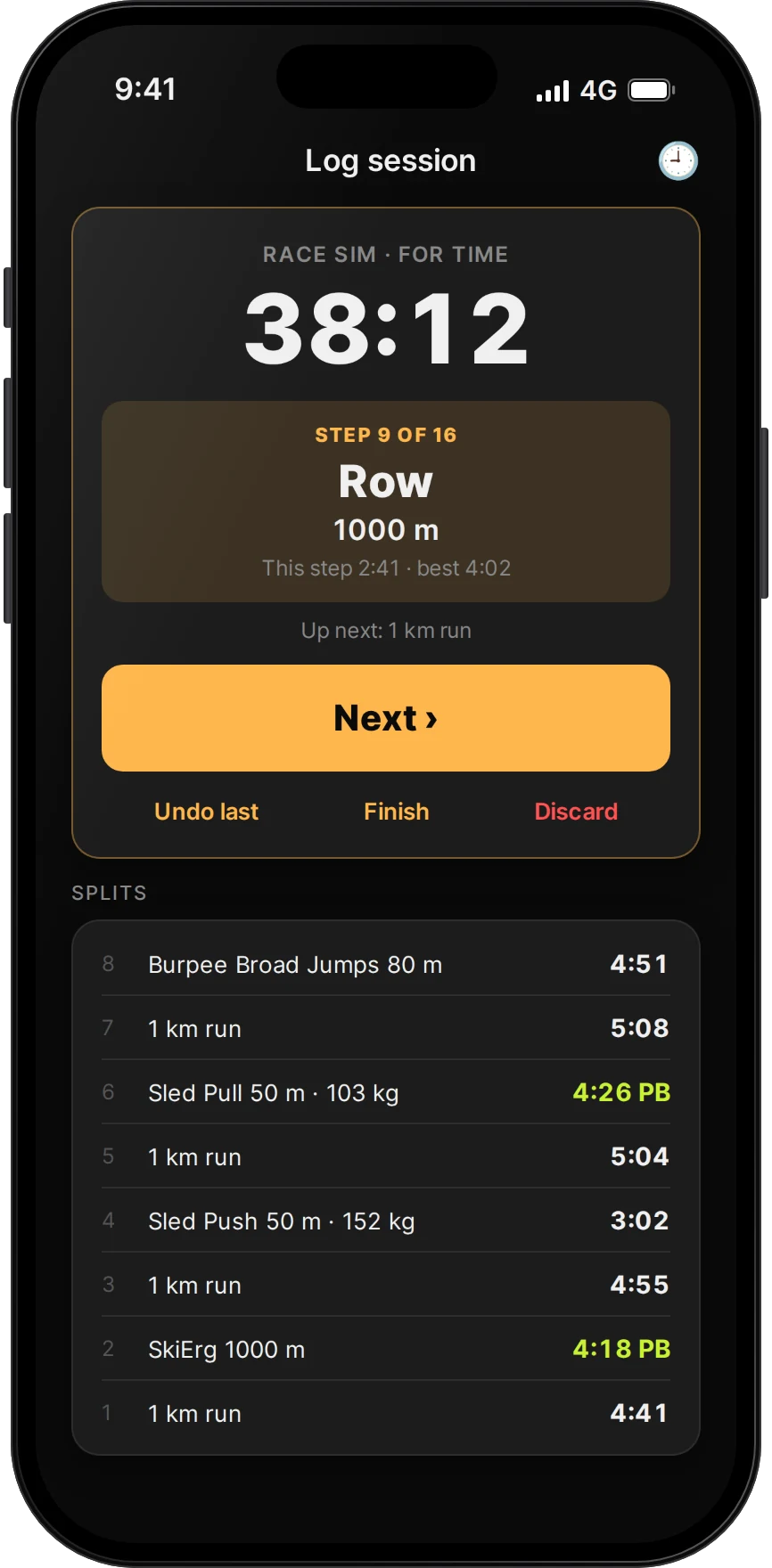
Strand Pro adds a split-by-split race plan built from your times, along with 5K, 10K and half marathon predictions from your runs.
Three race sims to start with
Half sim
| Step | Effort |
|---|---|
| 1–2 | Run1 km, then Station1,000 m ski erg |
| 3–4 | Run1 km, then Station50 m sled push |
| 5–6 | Run1 km, then Station50 m sled pull |
| 7–8 | Run1 km, then Station80 m burpee broad jumps |
About half the full race. A good first sim and a useful check-in every few weeks.
Compromised running
Four rounds of a 1 km run straight into 50 wall balls, for time. The point is the run after the wall balls: hold your pace when your legs and lungs are already working.
Full sim
All eight runs and all eight stations in race order. Save it for a few times in a training block, a few weeks before race day, and keep the week around it lighter.
Not affiliated. Strand is not affiliated with, endorsed by or connected to HYROX or any race organiser. Race sims in Strand follow the general format of running plus functional stations; check your own event's rules for exact distances and weights.
Common questions
What is a hybrid race simulation?
A training session that copies the race format: eight 1 km runs, each followed by a functional station such as sled push, rowing or wall balls. Half sims and compromised running sessions use the same idea in a shorter session.
How do I time a race sim?
Run one clock for the whole session and mark a split at the end of every run and every station, noting the weight or reps. Strand's live split timer does this with one tap per split, shows your best for each step and saves every split to your log.
Is there an app that times hybrid race sims?
Yes. Strand has a live split timer for race sims, EMOMs, AMRAPs and your own circuits. It records every split, shows station PBs as you go, runs on the iPhone Lock Screen, and predicts your race finish time from your bests. Strand is free on iPhone and Android.
How often should I do a full race sim?
A few times in a training block is plenty for most people, with half sims and compromised running sessions in between. Full sims are tiring, so keep the days around them lighter.
Can Strand predict my race time?
Yes. Strand adds up your best run splits, station times and an allowance for transitions into a predicted finish time. Strand Pro adds a split-by-split race plan and 5K, 10K and half marathon predictions.
Every split. Timed.
Strand times race sims, EMOMs, AMRAPs and your own circuits, and keeps them with your gym sessions, runs and food. Free on iPhone and Android.


This guide is general information, not medical or coaching advice. If you have an injury or health condition, speak to a qualified professional.